
Scratch Emulator
coding
Rate This Game
Total Plays
1
Rating
0.0
/10
Community Feedback
0
About This Game
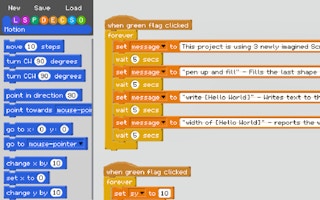
CLICK THE REAL GREEN FLAG AGAIN TO
RUN THE PROJECT 'IN' THE PROJECT :)
Click it again again to stop it.
CLICK THE REAL GREEN FLAG AGAIN TO
RUN THE PROJECT 'IN' THE PROJECT :)
Click it again again to stop it.
━ How to use ━━━━━━━━━━━━━━
★ Create Scripts to dragging blocks off the side panel
★ Rename variables by clicking on them
★ Delete blocks by dragging them onto the side panel
★ Scroll up and down using the arrow keys or mouse scroll wheel
★ Left & Right arrow keys to scroll left and right
★ Duplicate a block stack by holding down alt before dragging.
★ RUN THE PROJECT by clicking the green flag again, or clicking the green flag hat block of your script.
How to make block inputs:
-Use [square brackets] to make a string input.
-Use (round brackets) to make a number input.
-Use to make a boolean input.
-Text inside the brackets becomes the input's name.
Earn Coins While Playing!
Join & Start Earning!
Register now and earn coins for every minute you play games. Redeem coins for real rewards!
Play Games
Enjoy your favorite games
Earn Coins
10 coins per minute
Get Rewards
Redeem for real prizes